
CRDR BIM - BIM Clash Resolution Reporting for Navisworks
CRDR BIM is a Navisworks plugin developed by VAVETEK AI that compares before-and-after BIM models and generates structured Clash Resolution Diagnosis Reports. It helps BIM teams document which clashes were resolved, unresolved, approved, or manually connected and share the results in HTML or PDF formats.
What is CRDR BIM?
CRDR BIM is a straightforward Navisworks plugin that streamlines the process of creating Clash Resolution Diagnosis Reports for Building Information Modeling (BIM) projects. It fits right into Navisworks, helping BIM managers and specialists manage workflows more effectively, simplify compliance reporting, and boost teamwork. Thanks to its easy-to-use interface and quick performance, CRDR BIM is a go-to tool for documenting clash resolutions efficiently.
Key Features
Efficient Clash Resolution Reporting
Easily generate detailed reports that document how clashes have been resolved between different versions of your BIM models.
Navisworks Plugin Integration
CRDR BIM functions as a dedicated plugin within Navisworks, enabling seamless comparison of ‘before’ and ‘after’ BIM models and facilitating the production of comprehensive Clash Resolution Diagnosis Reports directly within your existing Navisworks workflow.
User-Friendly Interface
Navigate the software with ease, thanks to its intuitive design and straightforward workflow.
Consistent Viewing Angles
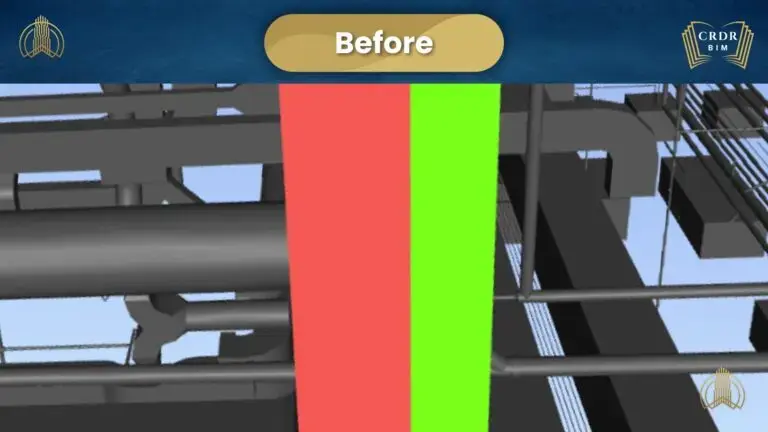
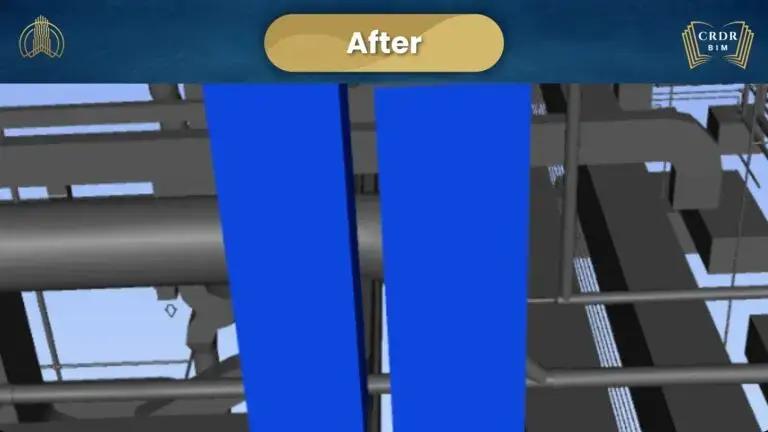
Maintain the same perspective when capturing images of clashes in both models, ensuring clear comparisons.
Customizable Clash Categorization
Categorize clashes as resolved, unresolved, approved, or resolved but connected manually for precise documentation.
Flexible Reporting Formats
Save and share your reports in HTML or PDF formats, complete with images and summaries.

CRDR BIM Report sample
Get a closer look at the precision and effectiveness of CRDR BIM through a sample report pulled from an actual project
Clash Detection and Resolution Visualization
Detailed Clash Resolution Summary
[

](#elementor-action%3Aaction%3Dlightbox%26settings%3DeyJ1cmwiOiJodHRwOlwvXC92YXZldGVrLmFpXC93cC1jb250ZW50XC91cGxvYWRzXC8yMDI0XC8xMVwvQ1JEUlNVTU1BUlkuanBnIiwidHlwZSI6ImltYWdlIn0%3D)
Frequently Asked Questions
What is CRDR BIM?
CRDR BIM (Clash Resolution Diagnosis Report in BIM) is a Navisworks plugin for documenting and reporting BIM clash-resolution outcomes. It compares before-and-after models, captures consistent views of clashes, categorizes their resolution status, and generates structured reports for coordination, compliance, and stakeholder communication.
CRDR BIM is designed for BIM managers, BIM coordinators, contractors, engineers, and other project teams that need a clear record of how coordination clashes were addressed.
What Problem Does CRDR BIM Solve?
Resolving a BIM clash is only part of the coordination process. Project teams also need to document what changed, which clashes were resolved, which remain unresolved, and what decisions were approved. CRDR BIM helps organize this information into a structured Clash Resolution Diagnosis Report, reducing reliance on manually assembled screenshots, spreadsheets, and email-based records.
How CRDR BIM Works
1. Load the BIM models
Open the relevant BIM models in Navisworks within the existing coordination workflow.
2. Compare before and after models
CRDR BIM compares the models to help document changes made during the clash-resolution process.
3. Capture consistent clash views
The plugin maintains consistent viewing angles so that before-and-after images can be compared clearly.
4. Categorize clash outcomes
Clashes can be categorized as resolved, unresolved, approved, or resolved but connected manually.
5. Generate the report
Generate and share the final Clash Resolution Diagnosis Report in HTML or PDF format, including images and summaries.
Who can benefit from CRDR BIM?
BIM managers, coordinators, specialists, and any professionals involved in documenting clash resolutions within BIM models.
How does CRDR BIM integrate with Navisworks?
CRDR BIM works as a plugin within Navisworks, allowing users to compare models, capture images, categorize clashes, and generate reports without leaving the Navisworks environment.
Can I customize the clash categories in the report?
Yes, you can categorize clashes as resolved, unresolved, approved, or resolved but connected manually.
In what formats can I export the reports?
Reports can be saved and exported in HTML and PDF formats for easy sharing and documentation.
Get Started with CRDR BIM Today
Transform the way you document and share clash resolutions in your BIM projects with CRDR BIM.
Contact Us to learn more or to schedule a demo.