

MEP Coordination with Automatic Clash Resolution in Revit
BAMROC is an AI-powered BIM software developed by VAVETEK AI for automatic MEP coordination in BIM. It works with MEP vs MEP and MEP vs Structure clashes in BIM models, helping BIM/VDC teams reduce repetitive manual clash resolution.
What is BAMROC?
BAMROC (BIM Automatic Modular Resolver of Clashes) is AI-powered clash-resolution software by VAVETEK AI that automates the clash-resolution step of MEP coordination in Revit. It does not detect clashes. It takes clashes already found in Navisworks or KLASH BIM and resolves them inside your Revit model.
For each eligible MEP vs MEP or MEP vs structure clash, BAMROC picks a Move or Bend strategy, keeps your configured clearances and logs any disconnections for review, so your team can spend its MEP coordination time on review instead of repetitive rework. It is the fully automatic member of the VAVETEK AI family; HUBAROC is the human-assisted option for clashes that need engineering judgement.
BAMROC Live Demo Webinars
Live Demo with Stjepan Mikulić from AI in AEC
Live Demo with Niknaz Aftahi from aec+tech
BAMROC Case Studies
BAMROC - Ecomes Case Study
BAMROC - Sanelac Case Study
Testimonials
“I’ve been collaborating with VAVETEK AI since the beta phase of BAMROC, and now we’re actively using it on multiple live projects. The improvements in automated MEP and MEP vs Structural clash resolution are even more impressive in production, it’s significantly reducing manual coordination time, minimizing rework, and helping us deliver clash-free models faster than ever. BAMROC is setting a new standard for efficiency in the industry.”
[
Dr. Varun Jain, [Director Technical]
Sanelac Consultants Private Limited
Top Leading MEP Expert
“BAMROC helped us resolve the majority of clashes quickly while still giving us full control to review and validate every change. On a hospital project with around 120 coordination clashes between MEP systems and structural elements, BAMROC automatically resolved 86% of them, significantly accelerating our MEP coordination workflow and reducing the time spent on manual clash resolution.”
[

Aniket Nampalliwar, [MD]
Green-Ecomes Solutions Pvt Ltd
Leading Expert in Sustainability and BIM
“Being part of BAMROC’s beta testing has shown us just how much the software has evolved. The AI is handling MEP clashes with a lot more accuracy and speed and its efficiency has noticeably increased. I’m looking forward to seeing where this software goes next and how it continues to help us in the future.”
[
Artee Rana [Director]
AEC Digital Solutions
Leading Architect and BIM Expert
“We put BAMROC to work on a large hospital project with 1000+ MEP clashes. It automatically resolved the majority of them efficiently, and the visual resolution report provided by the VAVETEK AI team made it simple to review and trust the final coordinated model. We’re now using it consistently on our projects and it’s made clash detection and resolution much less time-consuming.”
[
Lavanya Penumarthy, [CEO]
BIM Innovage Solutions Pvt Ltd
Master of BIM-Integrated Architecture
GLOBAL PROBLEM
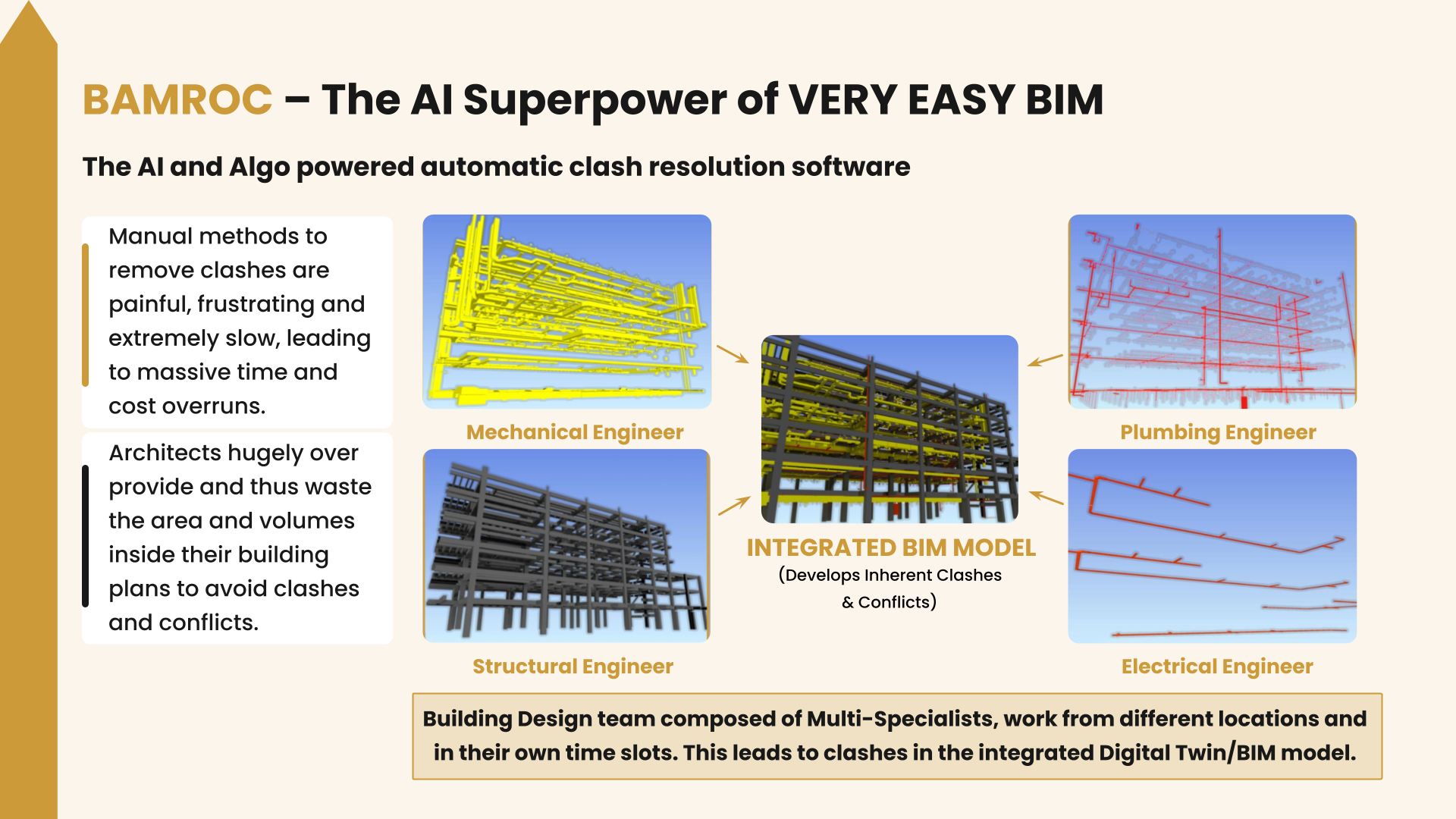
THE SOLUTION
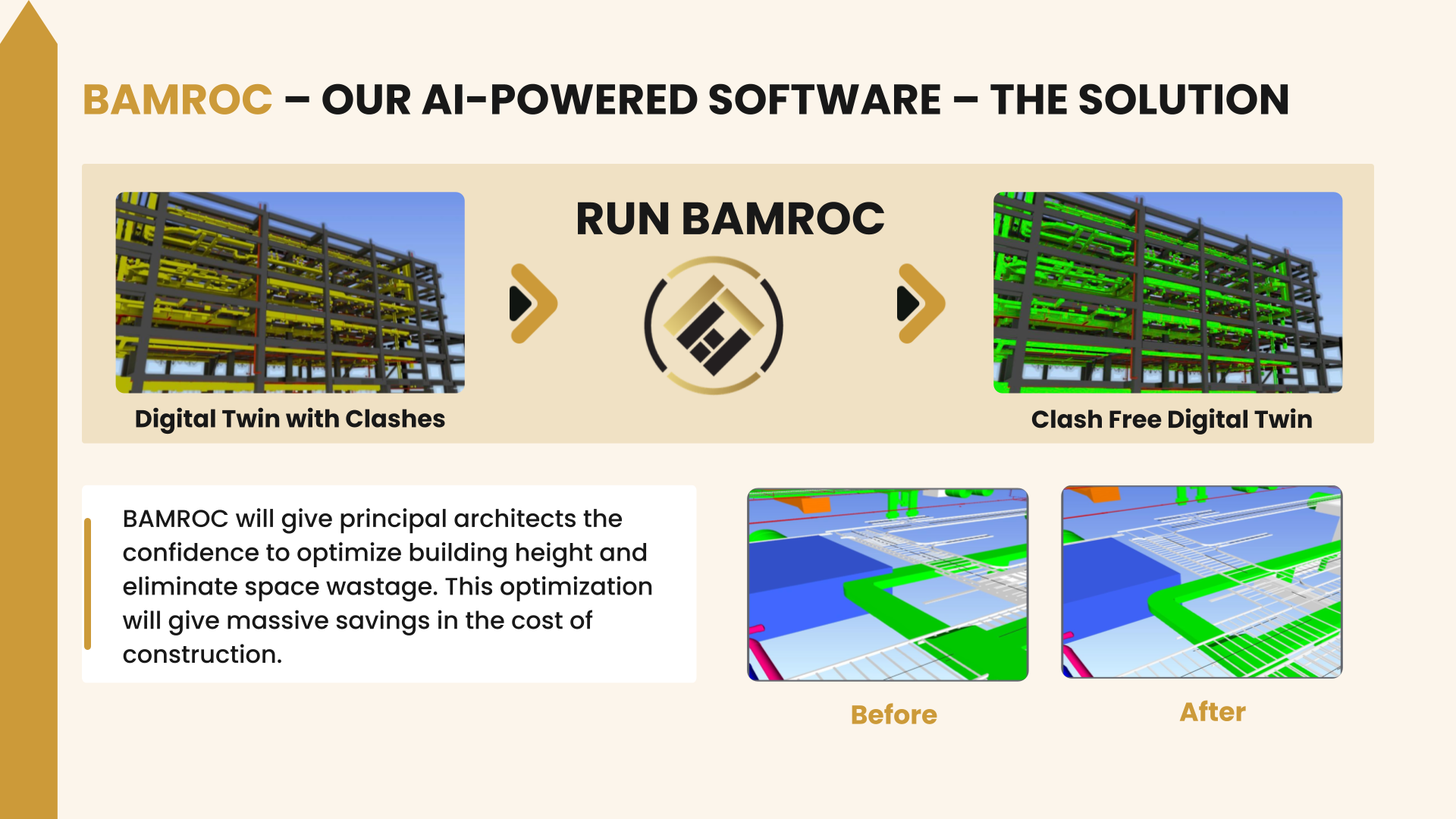
Automatic Clash Resolution for Faster MEP Coordination in Revit
Automatic Clash Resolution for Smoother MEP Coordination
BAMROC’s AI-powered workflow takes clashes you have already identified straight into resolution, so MEP coordination moves forward without manual rework on each one. It analyses MEP vs MEP and MEP vs structure clashes, evaluates possible resolution strategies, and automatically adjusts eligible MEP services in your Revit model. Your team reviews the results.
How AI Brings Automation to MEP Coordination in BIM
BAMROC is AI-powered BIM clash-resolution software that supports MEP coordination after clashes have been identified. It analyzes MEP vs MEP and MEP vs structure clashes, then applies a suitable resolution strategy to each eligible one in Revit. Your team spends less time on repetitive fixes and more time on review.

Here’s How Automatic Clash Resolution with BAMROC Improves Construction Coordination
Automated Clash Resolution and Removal in BIM
BAMROC automates the analysis and resolution of MEP vs MEP and MEP vs Structure clashes within BIM models. Its AI-powered engine evaluates identified clashes and applies suitable resolution strategies, helping reduce the manual effort typically required once clashes have been reported in tools such as KlashBIM. By connecting clash reporting with automated resolution, BAMROC supports faster, more consistent, and more efficient BIM coordination throughout the pre-construction workflow.


AI-Driven Movement and Bend Strategies for BIM Clash Resolution
BAMROC’s advanced AI capabilities enable intelligent movement and bend strategies for clash resolution. The software analyzes the surrounding architectural, structural, and MEP elements within the BIM model, evaluates available space and model constraints, and automatically adjusts eligible MEP services to help resolve identified clashes. By applying AI-driven placement and routing adjustments, BAMROC reduces manual rework and supports a faster, more accurate, and more efficient clash resolution workflow.
Frequently Asked Questions
What BIM Clashes Can BAMROC Resolve?
BAMROC is designed to automatically resolve BIM coordination clashes involving MEP systems and structural elements. Its primary automated resolution workflows include MEP vs MEP and MEP vs Structure clashes.
BAMROC uses AI-driven Movement and Bend strategies to determine and implement potential resolutions while maintaining configured clearances and system connectivity.
Current limitations
BAMROC currently has limitations for certain project and clash types, including industrial plants and infrastructure projects, special-geometry buildings, LOD400+ fabrication models, gravity pipes vs structure, and equipment vs MEP clashes.
Can BAMROC resolve clashes in every type of building?
No. BAMROC is built for standard building geometry. It does not yet support industrial plants, infrastructure projects, special-geometry buildings or LOD 400+ fabrication models. It also does not resolve gravity pipes vs structure or equipment vs MEP clashes. Check your project against these limits before you run it.
How BAMROC Works
1. Prepare the BIM model – BAMROC works with BIM models and supports cloud models on BIM 360/ACC and multiple or single Revit files.
2. Generate the clash report – The BAMROC workflow uses a clash report generated through the VAVETEK AI Navisworks plugin.
3. Run BAMROC – The AI analyzes the clashes and generates resolution predictions.
4. Apply a resolution strategy – BAMROC provides two main strategies:
Movement Strategy — moves elements to resolve conflicts.
Bend Strategy — bends systems or elements where appropriate.
5. Implement and review – The predictions are implemented in the Revit workflow, with errors and disconnections logged for review.
6. Validate the result – The CRDR workflow can be used to generate a visual report comparing the before and after models.
Who Uses BAMROC?
BAMROC is designed for professionals and organizations involved in BIM coordination and building engineering design, including:
BIM Coordinators
MEP Coordinators
BIM Managers
MEP Engineering teams
Mechanical, Electrical and Plumbing consultants
General contractors
EPC contractors
Building design and engineering teams
Where does BAMROC run? Is it cloud-based?
BAMROC runs as an add-in inside Autodesk Revit. When you click Run BAMROC, the clashes are processed on VAVETEK AI’s secure servers, and the prediction files are saved to your Downloads folder. You then apply them in Revit with the Move or Bend strategy.
Does BAMROC work with Navisworks and Autodesk Construction Cloud?
Yes. BAMROC reads clash reports created with the VAVETEK AI Navisworks plugin. It supports single or multiple Revit files, including cloud models on BIM 360 and ACC.
Can I control how BAMROC moves services?
Yes. Set the clearance between elements in Clearance Configuration, limit the working area with section boxes, and group parallel runs, such as cable trays or pipes, so they move together.
What happens if a resolution breaks a connection?
BAMROC logs every error and disconnection for each Revit file. Errors it fixed automatically are marked green; the rest are marked red, and you can reconnect them with Auto Connect. Use CRDR BIM to produce a visual before/after report.
BAMROC or HUBAROC: which one do I need?
Choose BAMROC to resolve the whole clash report automatically in one run. Choose HUBAROC when engineers want to pick the strategy clash by clash and approve each change live in Revit. Both use the same project configuration file.
Ready to revolutionize your BIM MEP designs with AI?
Contact us today to learn more about solutions and how we can help you achieve your goals.